Discuss a project

Spaces and their possibilities.
Images, concepts and films.

Guide · Renovation

Sell as is or renovate: how to show buyers the potential

If you are selling a property that needs work, you do not have to choose only between renovating first and showing nothing but its current state. You can sell as is and add a labelled renovation visualisation that shows buyers one possible direction: a concept to discuss, not a plan, a cost estimate or a promise.

Kitchen: Renovation visualisation · not the current state
Renovation visualisation · not the current state
Discuss a project

Last reviewed on

At a glance

  • There are three options: renovate first, sell as is, or sell as is and show a possible direction.
  • A visualisation shows finishes, materials and furnishing. It does not show costs, feasibility or permits.
  • Every renovation image is labelled and shown next to the current state.

Sell as it is, or show the potential?

Renovating before a sale is a financial and practical decision for you and the right professionals, so we give no figures on whether it pays. Showing the potential is a different, smaller step: the property is sold as it is, and buyers get an idea of what it could become.

Buyers will still judge the work involved for themselves. A visualisation helps them picture an outcome. It does not change what the renovation would cost.

  • Renovate first: buyers see a finished result, but you carry the cost, the time and the decisions.
  • Sell as is: the simplest route, and enough if buyers will judge the work themselves.
  • Sell as is and show a visualisation: the property stays as it is, and buyers see one possible direction next to honest photos of today.

What a visualisation shows, and what it does not

It shows a possible look based on your photos: floors, finishes, materials, colours and furnishing. It does not show technical feasibility, costs, dimensions or permissions.

That boundary protects both sides. A buyer should never read a renovation image as a cost estimate, a construction plan or a sign that work has been approved.

A visualisation does not help where the question is structure, services or cost. Those need qualified professionals who assess the actual property, not an image.

Kept, changed, open: how to read a renovation image

Read every renovation image in three layers: what is kept, what is changed, and what remains open.

We agree in advance which changes are shown. Naming them in a short caption makes the image easier to read, for example “New flooring and kitchen fronts, visualisation”.
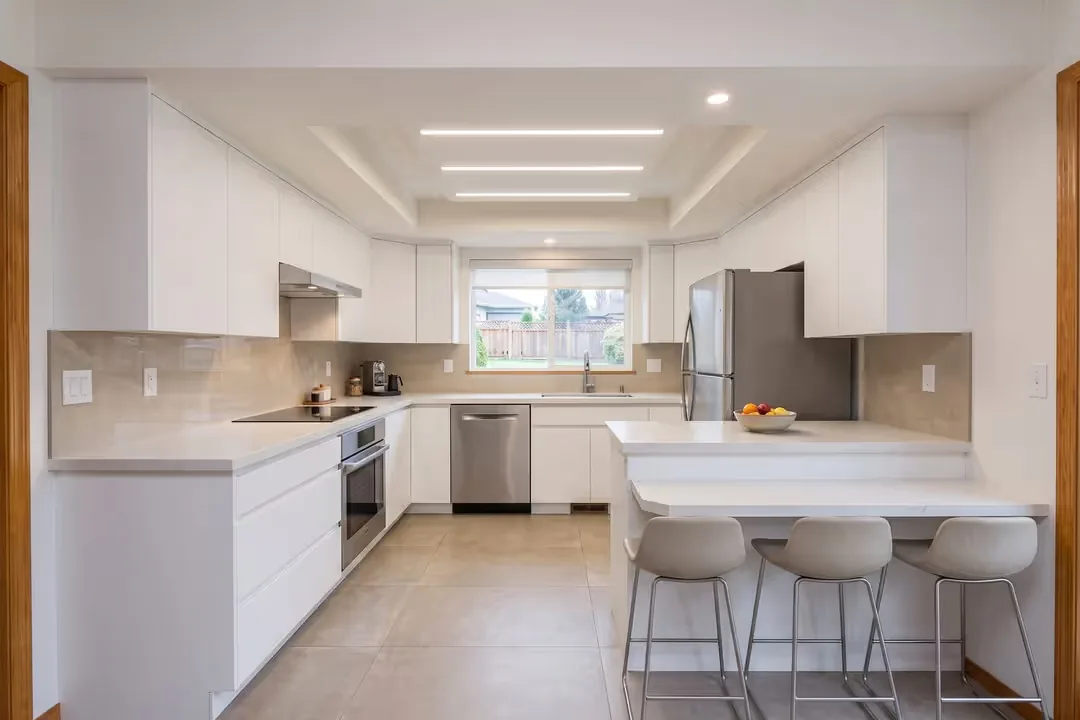
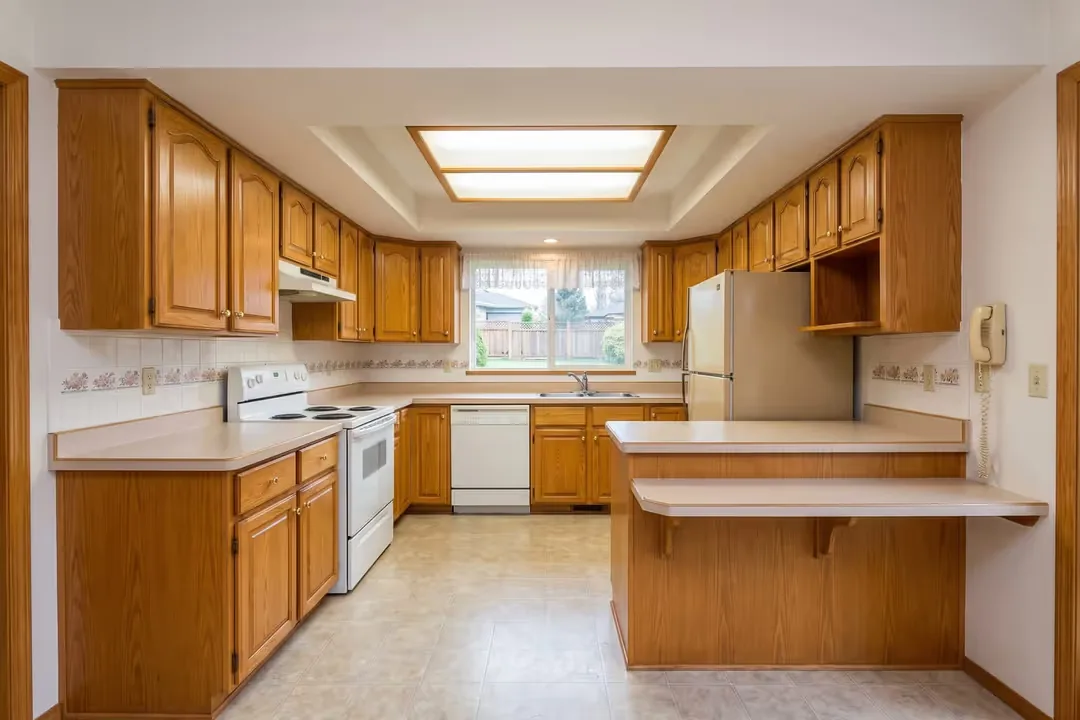
Kitchen: Renovation visualisation · not the current stateKitchen: Source photo, current state
Source photo, current stateRenovation visualisation · not the current state

See alsorenovation visualisation from your photos

  • Kept: the room as photographed. The image establishes no dimensions or proportions.
  • Changed: the agreed visible elements, such as flooring, wall finishes, kitchen fronts or furniture
  • Open: everything the image cannot answer, such as structure, services, cost and approvals

How do I label it?

Label each renovation image as a visualisation that does not show the current state, and place the photo of the room as it is today right beside it.

We mark every renovation image this way, because anyone who books a viewing should find the room from today’s photos, not the idea. Add a sentence to the description, and check the current rules of the portal you use before you publish.

What material do I need?

Good photos of the current state and a short description of what you would like to show are enough to begin.

  • Sharp photos of each room you want to visualise, ideally from a corner and in daylight
  • Basic information about the property and the rooms
  • The changes you have in mind, or a style you would like to see
  • Reference images, if you have them
  • Anything that must stay as it is

See alsophotographer or the photos you already have

Common questions

Does a renovation visualisation tell me what the work would cost?

No. It shows a possible look, not a cost estimate. For costs and feasibility, ask the relevant professionals.

Can you show a different layout, such as a wall removed?

Our renovation visualisations focus on visible finishes, materials and furnishing. A wall removed or moved is a structural question that the image does not answer.

Should I renovate before selling?

We cannot answer that in general. It depends on the property, your budget and your timing, and we do not give figures. An agent or valuer who knows the local market can help.

Can I show more than one direction?

Yes. Alternative options can form part of a separately agreed scope.

Your project with Visadra

Tell us about
your idea.

Thinking about how to present a property that needs work? Tell us what you would like buyers to see. Your name and email are enough to start. We review your photos, agree with you which changes the visualisation will show, and label it clearly as an idea.

contact@visadra.com

Your interestRenovation Visualisation

How can we reach you?
Add a phone number or a link to your listing or photosOptional

No obligation. No newsletter.

VISADRA

Privacy & contact

We store the details submitted through the contact form and the selected language to review and respond to your enquiry. Your name and email are required. Phone number and message are optional. A success message appears after storage is confirmed. Your contact details are not used for newsletters.

You can use the contact form for questions about your details.

contact@visadra.com

Optional website analytics with PostHog begins only with your consent. Recording interactions requires separate consent. You can change your choice in the privacy settings.

Your manual language choice is stored in a cookie for one year as an essential website preference.

Local preview. Full business and privacy information is still to be completed before publication.

VISADRA

Provider
Julius Reich
Milan, Italy

Email

contact@visadra.com

Local preview: the provider address and complete legal information will be added before publication.